Servers can be connected via a dedicated or a shared port.
In turn, a port can be full-duplex.
Differences between the ports and their characteristics
1) With a dedicated port the internet speed is always the same. For example, you rent a server with a 100 Mbit channel. In this case the speed will be the same at any time of day or night: 100 Mbps.
2) Shared port - the internet speed may vary depending on the channel load. For example, you have a server with a 200 Mbit shared channel; this means the speed may sometimes be 100 Mbit, 150 or 70. In most cases the speed does not drop by more than 50%.
3) If the channel is full-duplex - this means you can load it to the maximum for both inbound and outbound traffic.
For example, if you have a server with a 500 Mbit dedicated full-duplex channel, you can push 500 Mbps of traffic both inbound and outbound, in both directions, for a total of 1000 Mbit. If it is not full-duplex, then 500 Mbit will be the total bandwidth.
Testing server speed with Speedtest
Important! Run the commands as the root user in the command line.
1) Go to the folder where we will download the speedtest file.
# cd /
# cd tmp
2) Download the speedtest.py file
# wget wget -O speedtest-cli https://raw.githubusercontent.com/sivel/speedtest-cli/master/speedtest.py
3) Set the required permissions for the folder and file
# chmod +x speedtest-cli
4) Run the speed test
# ./speedtest-cli
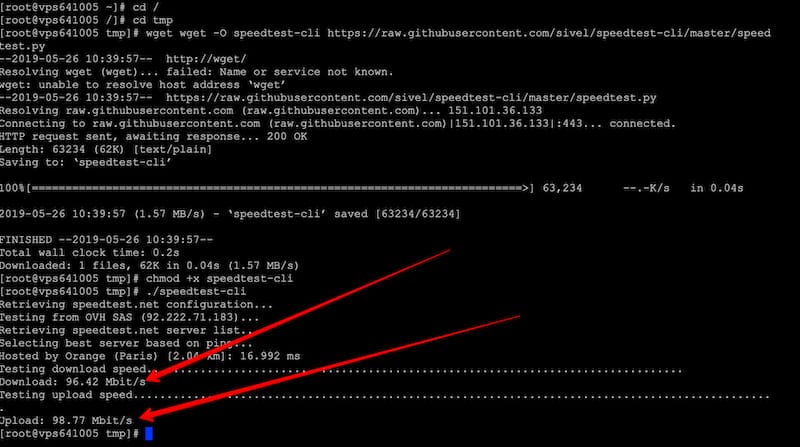
As you can see in the photo, in this example the server speed is:
Download: ~96 Mbps
Upload: ~98 Mbps