In the Linux environment there are several text editors; the simplest one, built into the operating system by default, is vi.
Before you start using it, you need to understand that this editor has two operating modes, which you constantly have to switch between:
1) Insert mode - entered by pressing the letter "i"
2) Command mode - entered by pressing "esc"
If you need to type, change or edit text - switch to insert mode
If you need to save, or exit the editor or file - switch to command mode
The sequence of steps for creating or editing a file in vi
First, let's create a file or open an existing one:
# vi filename.txt
Next, to be able to write something inside the file, switch to editing mode by pressing the Latin letter "i" on the keyboard.
The label -- INSERT -- at the bottom shows that we have switched to this mode
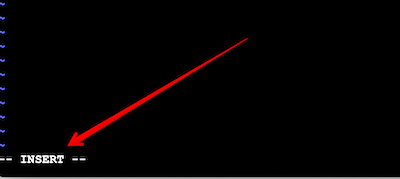
Navigation within the file is done using the arrow keys on the keyboard.
After editing the text, let's save the file. To do this, switch to command mode by pressing "esc" and enter the command :w
The main commands of the vi text editor
In command mode (esc) enter:
# :w - save the file
# :10 - go to line 10 in the file
# :q - exit the editor
# :q! — exit the editor without saving
# :wq - save and exit the editor
# ZZ - a quick key combination to save and exit the editor
You can watch a short video overview of the vi editor here: